


Garmin Pilot
2.7896.00 Reviews
App Specs
- Version
- 26.2.0
- Updated On
- License
- Free
- Downloads
- 500,000+
- Developer
- Garmin
- Categories
- Weather
- Platform
- Android, iOS
Screenshots
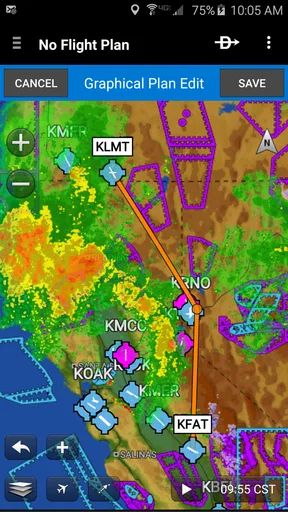
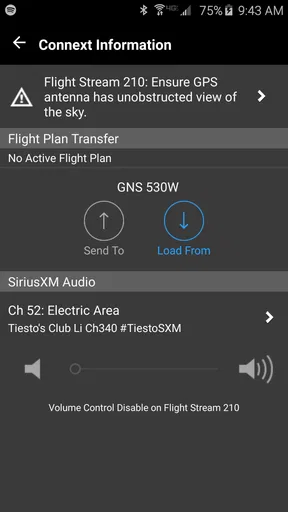
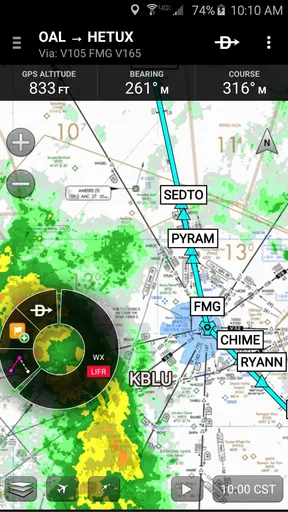
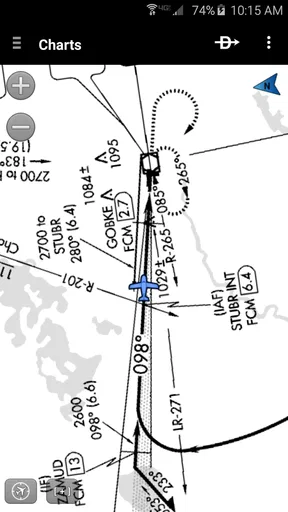
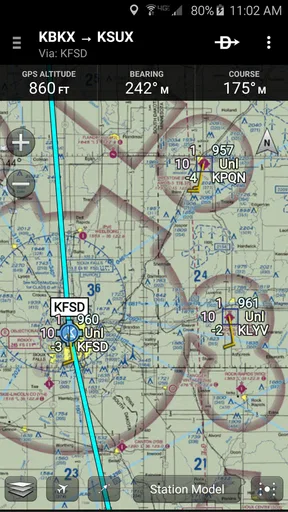
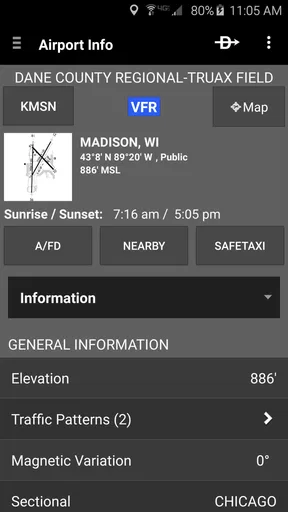
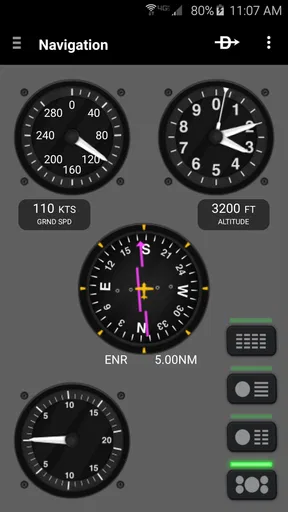
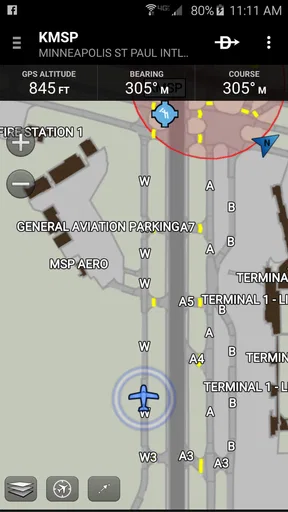
 Analysis by AppCompare
My first useful moment with Garmin Pilot was not in the air; it was realizing that this is an aviation planning tool, not a general weather app with a map attached. If you are opening it for the first time, that distinction helps set expectations. The app is made by Garmin, and its focus is helping pilots bring planning, navigation and weather information together. I would approach it as one part of a careful flight-planning routine, rather than as a substitute for training, judgment or required cockpit procedures.
What to expect from an aviation-focused app
Garmin Pilot is a free app in the weather category, but that does not mean every capability is free to use: in-app purchases are listed from $74.99 to $109.99 per item. It has a 2.7 average from around 2,600 ratings, with roughly 894 written reviews, and has been installed over 500,000 times. It is rated for Everyone, though its subject matter is clearly aimed at pilots rather than casual weather checking. The current version is 26.2.0, and it requires iOS 11 or later.
That mix of broad aviation ambitions and a relatively low average rating is worth keeping in mind. I would not treat a rating as a verdict on whether the app fits your aircraft, workflow or region; I would treat it as a reason to test the parts you expect to rely on before building them into your routine. If all you want is to know whether to carry an umbrella, a standard weather app will be simpler. If you plan flights and need aviation-oriented information in one place, Garmin Pilot is a more relevant starting point.
Getting ready before your first flight plan
When I first set up an aviation app, I try to make the first session about learning the layout, not rushing to prepare for departure. Open the map, look through the planning area, and identify where weather information appears. Then check how the app presents a route and its supporting details. Doing this while you are on the ground gives you time to understand the controls without the pressure of an upcoming flight.
Garmin hardware owners may have an additional reason to explore the setup: the app is designed to integrate with Garmin avionics. I would check that connection in a calm setting and confirm that the information I expect to see is actually available in my own configuration. If you do not fly behind Garmin equipment, the app can still be used independently, but I would avoid assuming that the standalone experience will match an avionics-connected setup in every detail.
Your first meaningful result: a route you understand
A practical first task is to create a simple flight plan and review the information attached to it. The app includes flight-planning tools, fuel calculations and estimated time en route, so you can see how those pieces relate to the route you enter. I find it more useful to inspect each value than to accept a completed plan at a glance: check that the route reflects your intention, and treat calculated figures as planning aids that still need to fit your aircraft and operating requirements.
Weather overlays are another good way to learn the app before a trip. Showing weather on the map can make it easier to see how conditions relate spatially to a proposed route. The useful habit is to compare the map view with the underlying information and your broader briefing, rather than reading a colored layer as a complete answer. That small distinction makes an aviation app more helpful: it supports a decision, but it does not make the decision for you.
Worth Reading Before You Choose

EA SPORTS FC Mobile 26 Is a Bigger Football Game, but It Takes Time

Flipboard Shows What News Apps Must Do Beyond the Feed

Switching to Android Auto Means Rethinking Your Driving Routine

Google Calendar Makes a Crowded Week Easier to Manage

Ludo King Makes the Most of the Minutes Between Plans

Baby Panda World Brings Quick Play to Modern Phones, but Its Game Library Feels Busy
Features That Stand Out
Alright, let's dive into the juicy details of what makes Garmin Pilot such a standout app. First off, the navigation capabilities are top-notch. You get everything from dynamic maps to real-time weather updates, which is super handy when you're up there dodging clouds and looking for the smoothest ride.
The app includes comprehensive flight planning tools. You can create flight plans with ease, and the app even provides fuel calculations and estimated time en route. It's like having a personal co-pilot right in your pocket!
Another cool feature is the weather overlays. You can overlay weather data directly onto your map, which makes it super simple to see storms, turbulence forecasts, and more. Trust me, this feature alone is worth its weight in gold when you're trying to plan a safe route.
User Experience
Using the app is pretty intuitive. The interface is clean and user-friendly, which is crucial when you’re multitasking in the cockpit. I found that the menus are well-organized, so you’re not fumbling around trying to find what you need. It's clear that Garmin put a lot of thought into the design to cater to pilots who need quick and reliable access to information.
Plus, the app runs smoothly without any noticeable lag, which is a huge plus when you're dealing with critical flight data. The last thing you need is an app that crashes mid-flight!
Connectivity and Compatibility
One of the things I really appreciate about the Garmin Pilot app is its seamless integration with Garmin avionics. If your aircraft is equipped with Garmin hardware, you’re in for a treat because the app syncs effortlessly, providing you with even more detailed information and control.
And don’t worry if you’re not flying a Garmin-equipped plane. The app is versatile enough to work well on its own, providing all the essential features you’d need on your flight.
Is It Worth It?
Now, let's talk about the investment. Yes, there’s a subscription fee, but considering the wealth of features and the peace of mind it offers, I’d say it’s totally worth it. If you’re serious about flying, this app is a valuable tool that can enhance your flying experience significantly.
Where it fits in a pilot’s toolkit
The strongest case for this app is for someone who already thinks in terms of routes, fuel, timing and weather together. A casual flyer planning an occasional outing may prefer a simpler weather app for everyday forecasts and use an aviation tool only when needed. A student pilot, by contrast, may find value in getting familiar with how a route and weather picture are considered together, while still checking every decision with an instructor and approved sources.
Compared with ordinary weather apps, Garmin Pilot is aimed at flight planning rather than broad household forecasting. Compared with using a charting or planning tool alongside a separate weather app, its appeal is the ability to view route-related information in a connected workflow. The trade-off is that an aviation-focused interface can feel like too much if you have no flight-planning task in mind, and Garmin-related integration matters most to people who already use compatible equipment.
A realistic ground-to-flight workflow
Imagine planning a daytime trip from a familiar airport. Before leaving home, I would enter the route, inspect the estimated time en route and fuel calculation, and look at the weather overlay in relation to that route. I would then compare what I see with the rest of my normal preflight process, resolve any discrepancies, and make sure I can find the key screens without hunting through menus. The app’s first success is not simply displaying a route; it is helping me prepare a plan I understand well enough to review critically.
That workflow also reveals a useful limitation: a map can make weather patterns easier to visualize, but it can tempt you to over-trust a single display. I would use overlays to notice where further investigation is needed, not to declare a route safe. Likewise, fuel and time estimates are helpful for organizing a plan, but they are not a substitute for checking the assumptions and applying the requirements relevant to the aircraft and flight.
Small habits that make the app easier to trust
One practical tip is to rehearse the route-planning steps with a familiar, low-pressure example before using them for a real departure. That makes it easier to spot an entry mistake, recognize which screen contains a calculation, and notice whether a result looks implausible. Another is to review the weather layer at more than one stage of planning: first to understand the broad picture, then again after you have settled on a route. This prevents the map from becoming a quick glance that substitutes for thoughtful review.
If you own Garmin avionics, test the connection and information flow before depending on it. Integration can be valuable, but it also adds a setup step and makes the exact experience dependent on the equipment you use. If you do not have that hardware, concentrate on whether the standalone planning and map workflow meets your needs; do not pay for an aviation tool simply because the brand is familiar.
Who should try it, and who may be happier elsewhere
I would consider it if I were an active pilot who wants planning, navigation and weather tools in one aviation-oriented app, especially if I already use Garmin equipment. It may also suit a newer pilot who wants to become comfortable examining a route and its associated information on the ground. For either group, the most reassuring first step is to explore the interface and prepare a practice plan before treating it as part of a flight routine.
I would skip it if my needs were limited to local forecasts, rain alerts or deciding what to wear. A mainstream weather app is usually faster for those jobs and avoids the learning curve of aviation planning. I would also be cautious if the purchase options do not fit my budget or if I expect an app to replace official checks, instruction or cockpit procedures. The free download lets you begin evaluating the experience, but the listed in-app purchases mean it is sensible to understand what you intend to use before spending.
Garmin Pilot was released on March 27, 2012, and its long presence in the category does not remove the need to judge the current version against your own workflow. The 2.7 average suggests that experiences vary, so I would use a grounded test: can I plan a familiar route, interpret the figures, and locate weather information confidently? If not, I would investigate the cause before relying on it. That is a more useful measure for an individual pilot than popularity alone.
Making the next step a sensible one
Once the first plan makes sense, the next step is not to add complexity for its own sake. I would learn the screens I actually need, confirm how the app behaves with my equipment, and keep my established briefing and verification habits intact. If the workflow saves effort without making me less attentive, it has earned a place in my toolkit; if the layout or purchase structure creates more friction than value, another aviation planning option may suit me better.
With its robust set of features, user-friendly design, and reliable performance, the Garmin Pilot app is a must-have for pilots of all levels. Whether you're planning a short hop or a long cross-country flight, this app has got you covered.
In conclusion, if you’re looking for an app that combines powerful functionality with ease of use, Garmin Pilot is definitely one to check out. It’s like having a flight assistant that fits right in your pocket, ready to help you navigate the skies safely and efficiently.
Pros
- Comprehensive flight planning features.
- Real-time weather updates.
- User-friendly interface.
- Seamless integration with Garmin devices.
- Offline maps for remote areas.
Cons
- Requires subscription for full features.
- Steep learning curve for beginners.
- High battery consumption.
- Limited compatibility with non-Garmin devices.
- Occasional app crashes reported.
FAQs for Garmin Pilot
What is Garmin Pilot used for?
Garmin Pilot is a comprehensive aviation application designed for pilots, offering a range of tools to aid in flight planning, navigation, weather monitoring, and more. It provides real-time information and a user-friendly interface to enhance safety and efficiency during flights. It's suitable for both private and professional pilots.
Is Garmin Pilot available on both Android and iOS?
Yes, Garmin Pilot is available on both Android and iOS platforms. This ensures that a wide range of users can access its functionalities, whether they are using an Android smartphone or an iPhone. Both versions offer similar features tailored to each operating system's capabilities.
What are the main features of Garmin Pilot?
Garmin Pilot includes features such as flight planning, real-time weather updates, detailed navigation maps, and interactive maps with terrain and obstacle overlays. It also offers flight plan filing, weight and balance calculations, and an easy-to-use interface that integrates seamlessly with other Garmin avionics.
Does Garmin Pilot require a subscription?
Yes, Garmin Pilot requires a subscription to access its full range of features. While there may be a trial period available, continued use of the app's comprehensive tools for flight planning, navigation, and weather data will necessitate a subscription plan, which varies based on the level of service chosen.
Can Garmin Pilot be used offline?
Garmin Pilot can be used offline to some extent. While many features require an internet connection, such as real-time weather updates, users can download maps and other necessary data for offline use. This is particularly beneficial for pilots flying in areas with limited connectivity.


